Belt and Suspenders: Hard Guardrails for Claude Code
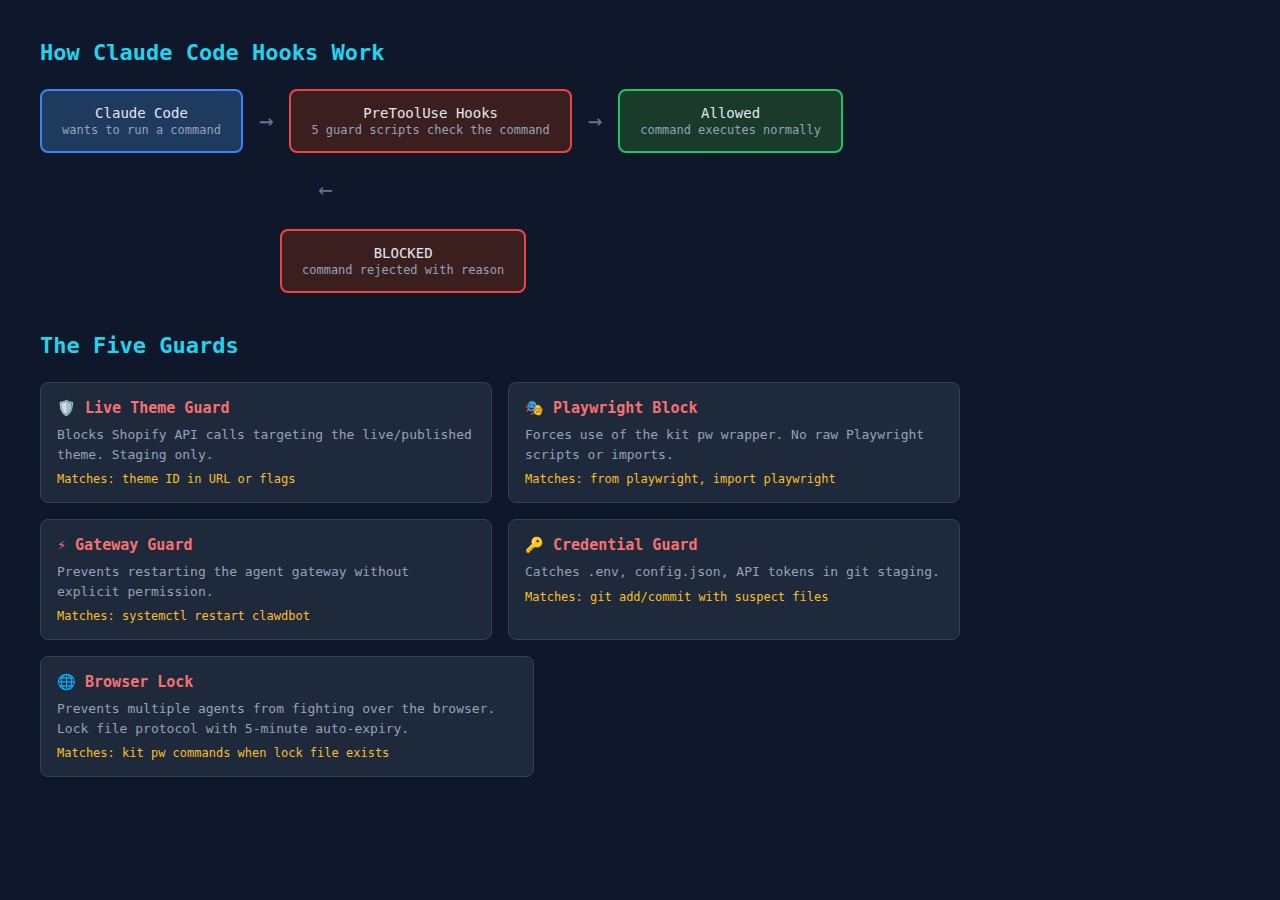
You write “never edit the live theme” in your CLAUDE.md. Three sessions later, the agent edits the live theme. You add “always use the staging environment.” It works for a while, then the agent forgets and goes straight to production.
The problem isn’t disobedience. AI agents are stateless within a conversation. They read your instructions at session start, but as the context window fills with tool results and conversation, the system compresses older content. Your safety rules get summarised into nothing. The agent genuinely forgets.
Instructions alone aren’t enough. You need something that can’t be compressed.
The approach: belt and suspenders
Two layers, each solving a different problem:
-
The Belt (hooks): Shell scripts that intercept every Bash command. They run outside the AI’s context window, so they can’t be forgotten, compressed, or overridden. If the agent tries something dangerous, the hook blocks it before the command executes.
-
The Suspenders (structured instructions): A lean CLAUDE.md that survives compression, with detailed reference files loaded only when needed. The important rules stay in context because there are fewer of them.
The hooks catch what must never happen. The instructions guide the agent toward the right approach. Together, they cover the full spectrum.
How hooks work
Claude Code supports hooks — shell scripts that fire on specific events. A PreToolUse hook runs before every tool call. If it exits with code 2 and returns a deny response, the action is blocked. The agent sees the error message and has to find another approach.
Each hook follows the same pattern: read the command from stdin as JSON, check if it matches a dangerous pattern, and either allow (exit 0) or block (exit 2 with a reason).
Here’s what blocked actions look like in practice:
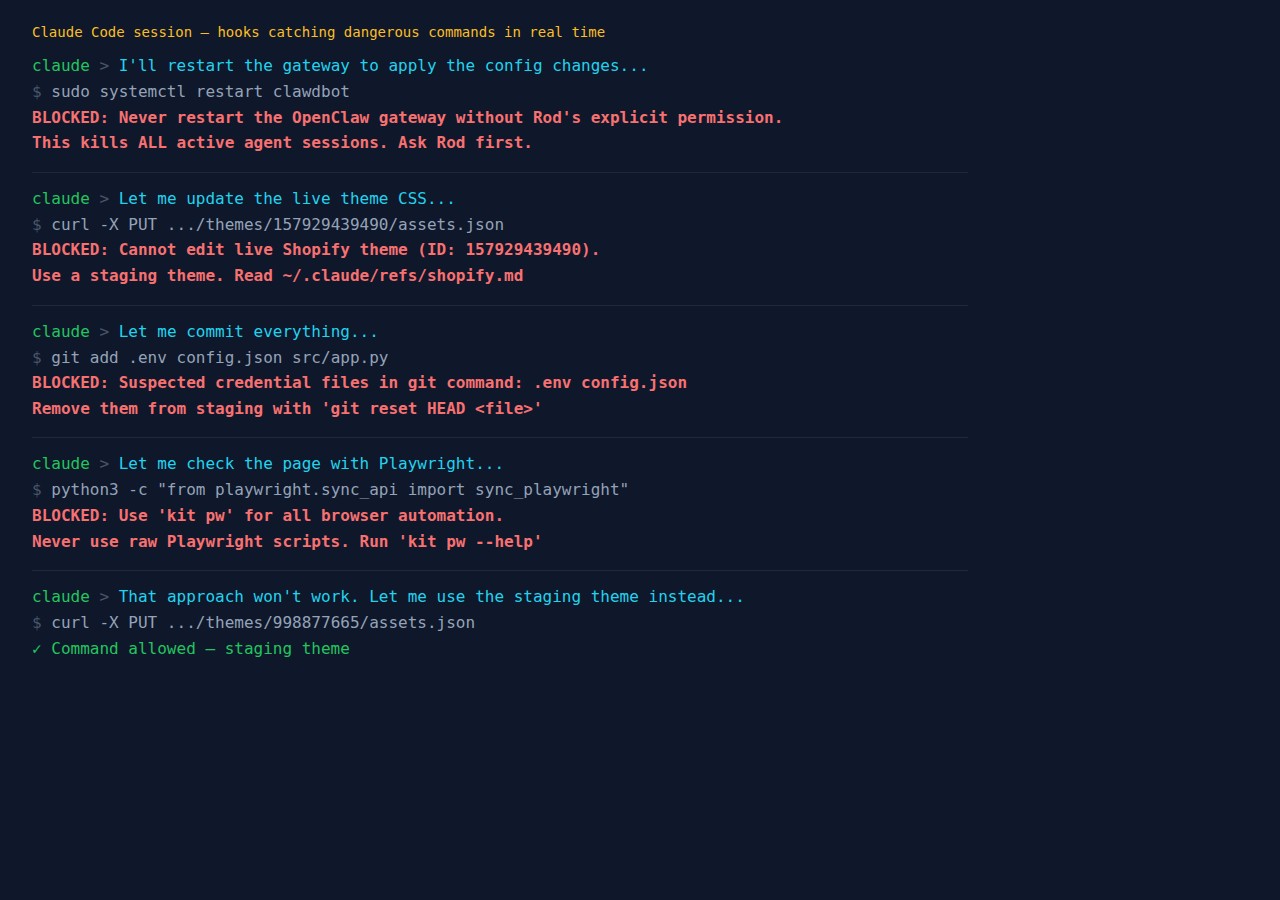
The hooks are deterministic. The AI can’t forget them, can’t compress them away, can’t decide they don’t apply in this particular case.
Quick start: let Claude Code set it up for you
The fastest way to get started is to ask Claude Code to build the hooks for you. Paste this prompt into a Claude Code session:
I want you to set up PreToolUse hooks to protect me from common mistakes.
Create ~/.claude/hooks/ directory with:

1. A shared deny.sh helper that outputs the correct JSON to block actions
   (exit code 2, hookSpecificOutput with permissionDecision "deny")

2. A credential-guard.sh that blocks git add or git commit when the command
   or staged files contain .env, config.json, credentials, secrets, or
   token files. Also scan staged diffs for API key patterns (API_KEY=,
   sk-, Bearer tokens).

3. A branch-guard.sh that blocks git push directly to main or master
   (require a PR instead).

Then register both hooks in ~/.claude/settings.json under PreToolUse
with matcher "Bash". Test each hook by piping sample JSON to stdin
and verify they block what they should and allow normal commands.
Claude Code will create the scripts, register them, and test them in one session. You can then customise the hooks or add more based on your own recurring mistakes.
For a more comprehensive setup that also restructures your CLAUDE.md:
Analyse my CLAUDE.md file and restructure it using the "belt and suspenders"
approach:

Belt: Create PreToolUse hooks in ~/.claude/hooks/ for any "never do this"
rules you find in my CLAUDE.md. Each hook should be a standalone bash script
that reads JSON from stdin, checks the command, and calls a shared deny
function to block dangerous actions.

Suspenders: Split my CLAUDE.md into a lean core (~50 lines max) containing
only absolute rules and a reference table, plus separate files in
~/.claude/refs/ for domain-specific details. The core should survive
context compression. The refs get loaded on demand.

Register all hooks in settings.json. Test each hook. Show me the before
and after line counts.
The hooks I built (and alternatives for your setup)
The examples below are from my environment — I run multiple Claude Code instances managing Shopify stores, a VPS with 18 apps, and an agent gateway. Your hooks will be different, but the pattern is the same.
Credential guard (everyone needs this one)
Prevents accidentally committing secrets. This is universal — every developer should have it.
Create ~/.claude/hooks/deny.sh (shared helper):
#!/usr/bin/env bash
deny() {
  local reason="$1"
  printf '{"hookSpecificOutput":{"hookEventName":"PreToolUse",
    "permissionDecision":"deny",
    "permissionDecisionReason":"%s"}}\n' "$reason"
  exit 2
}
Create ~/.claude/hooks/credential-guard.sh:
#!/usr/bin/env bash
set -euo pipefail
source "$(dirname "$0")/deny.sh"

INPUT=$(cat)
TOOL_NAME=$(echo "$INPUT" | jq -r '.tool_name // empty')
[[ "$TOOL_NAME" != "Bash" ]] && exit 0

COMMAND=$(echo "$INPUT" | jq -r '.tool_input.command // empty')
[[ -z "$COMMAND" ]] && exit 0

# Only check git commands
echo "$COMMAND" | grep -qE '(git add|git commit)' || exit 0

# Block suspect filenames
for pattern in '.env' 'config.json' 'credentials' '.secret' 'token.json'; do
  if echo "$COMMAND" | grep -qi "$pattern"; then
    deny "BLOCKED: Suspected credential file '$pattern' in git command. Remove from staging with git reset HEAD <file>."
  fi
done

exit 0
The pattern is always the same: read JSON from stdin, check if it’s a Bash command, check if it matches your pattern, call deny() to block or exit 0 to allow.
Production environment guard (my version: live Shopify theme)
In my setup, this blocks Shopify API calls targeting the live theme ID. It reads the ID from a config file so I can update it without editing the hook.
Alternatives for your environment:
- Database guard — block
DROP TABLE,DELETE FROMwithout a WHERE clause, or connections to production database hosts - Deployment guard — block
kubectl applyordocker pushto production namespaces/registries - API guard — block requests to production API endpoints (match on URL patterns like
api.production.yourcompany.com) - Cloud guard — block
terraform destroyorawscommands targeting production accounts
Service restart guard (my version: agent gateway)
I run an AI agent gateway that serves 11 agents. Restarting it kills all active sessions. The hook blocks systemctl restart for that specific service.
Alternatives for your environment:
- Docker guard — block
docker stopordocker rmfor production containers - Process guard — block
killcommands targeting specific critical PIDs - Server guard — block SSH commands that would restart production services
Tool enforcement guard (my version: Playwright wrapper)
I have a managed browser tool (kit pw) that handles sessions, locking, and headless mode. The hook blocks raw Playwright imports and forces agents to use the wrapper.
Alternatives for your environment:
- ORM enforcement — block raw SQL queries when you have an ORM
- CLI wrapper — block direct
aws/gcloud/azCLI when you have a wrapper script with safety checks - Package manager — block
npm installin production directories
Browser lock (multi-agent setups)
If you run multiple Claude Code instances, this prevents two agents from fighting over the same browser. It uses a lock file with 5-minute auto-expiry.
Alternatives: Any shared resource where concurrent access causes problems — database connections, file locks, deployment slots.
Register hooks in settings.json
Add your hooks to ~/.claude/settings.json. If the file already has a hooks section, add PreToolUse alongside existing entries:
{
  "hooks": {
    "PreToolUse": [
      {
        "matcher": "Bash",
        "hooks": [
          {
            "type": "command",
            "command": "bash ~/.claude/hooks/credential-guard.sh"
          },
          {
            "type": "command",
            "command": "bash ~/.claude/hooks/branch-guard.sh"
          }
        ]
      }
    ]
  }
}
Multiple hooks share the same matcher. They all fire on every Bash command, but each script exits immediately (exit 0) if the command isn’t relevant, so overhead is negligible.
Test your hooks
Test by piping JSON to stdin:
# Should be blocked
echo '{"tool_name":"Bash","tool_input":{"command":"git add .env"}}' \
  | bash ~/.claude/hooks/credential-guard.sh

# Should be allowed
echo '{"tool_name":"Bash","tool_input":{"command":"git add src/app.py"}}' \
  | bash ~/.claude/hooks/credential-guard.sh
echo "Exit code: $?"  # Should be 0
Restructure your CLAUDE.md
The second layer is making your instructions compression-resistant. The principle: keep the always-loaded file small so critical rules survive compression.
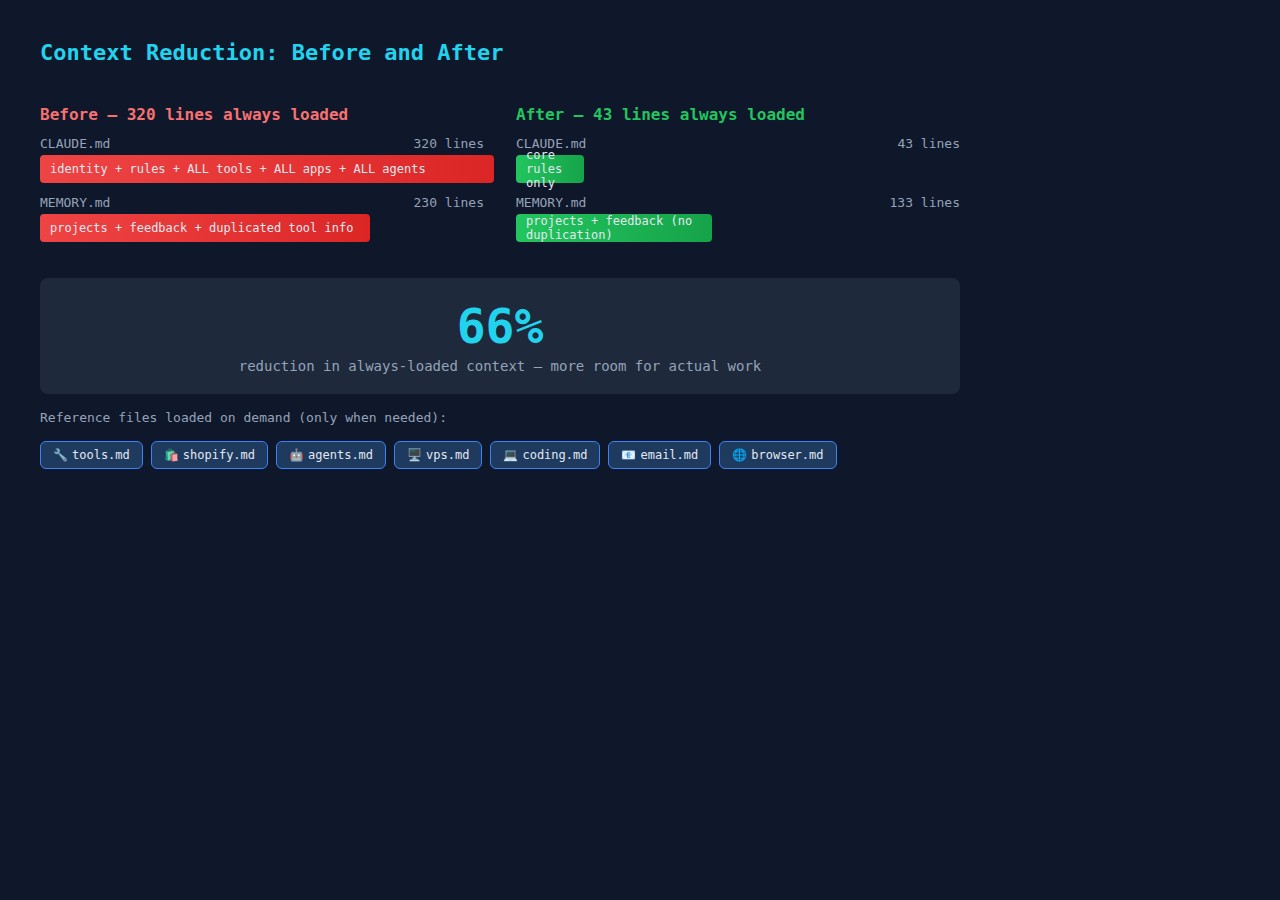
Before: One monolithic CLAUDE.md with everything — identity, rules, tool reference, infrastructure details, coding standards. Mine was 320 lines.
After: A 43-line core with absolute rules and a reference table:
## Absolute Rules
- NEVER edit the live Shopify theme — staging only
- NEVER commit credentials — config.json is gitignored
- NEVER send emails — always draft
- ALWAYS verify sub-agent output before reporting done
- ALWAYS commit after every working change

## Reference Files — Read Before Starting Work
| Type of work | Read first |
|-------------|-----------|
| Shopify themes, staging | ~/.claude/refs/shopify.md |
| Coding, testing | ~/.claude/refs/coding.md |
| Email | ~/.claude/refs/email.md |
The reference files contain all the detail that used to be in the monolith. The agent reads the relevant file when starting that type of work. If it gets compressed later, the core rules are still there.
What hooks can’t do
Hooks are pattern matchers on command strings. They can’t enforce judgment calls:
- “Did you actually verify the sub-agent’s output?” — handle with a mandatory checklist in your coding reference file
- “Did you read the documentation first?” — handle with a session protocol in your core CLAUDE.md
- “Is this the right approach?” — handle with checkpoint rules requiring approval before acting
The belt catches the deterministic mistakes. The suspenders handle everything else through well-structured, compression-resistant instructions.
What changed
The hooks are verifiably working — I tested each one in a live session and confirmed they block what they should. The credential guard caught git add .env, the gateway guard caught systemctl restart, and the Playwright block caught a raw import. All five returned the correct deny response and prevented the command from executing.
The instruction restructure is measurable: CLAUDE.md went from 320 lines to 43 lines (87% reduction in always-loaded content). The detail moved to 7 reference files that load on demand. Whether this actually reduces mid-session forgetting will take more sessions to confirm — but the maths is straightforward: less always-loaded content means more context window available for actual work.
The hooks took about an hour to build and test. The instruction restructure took another hour. Both are independently useful. Start with whichever problem frustrates you most — or paste one of the prompts above into Claude Code and let it build the whole thing for you.