How Plan Mode Changed the Way I Build Software
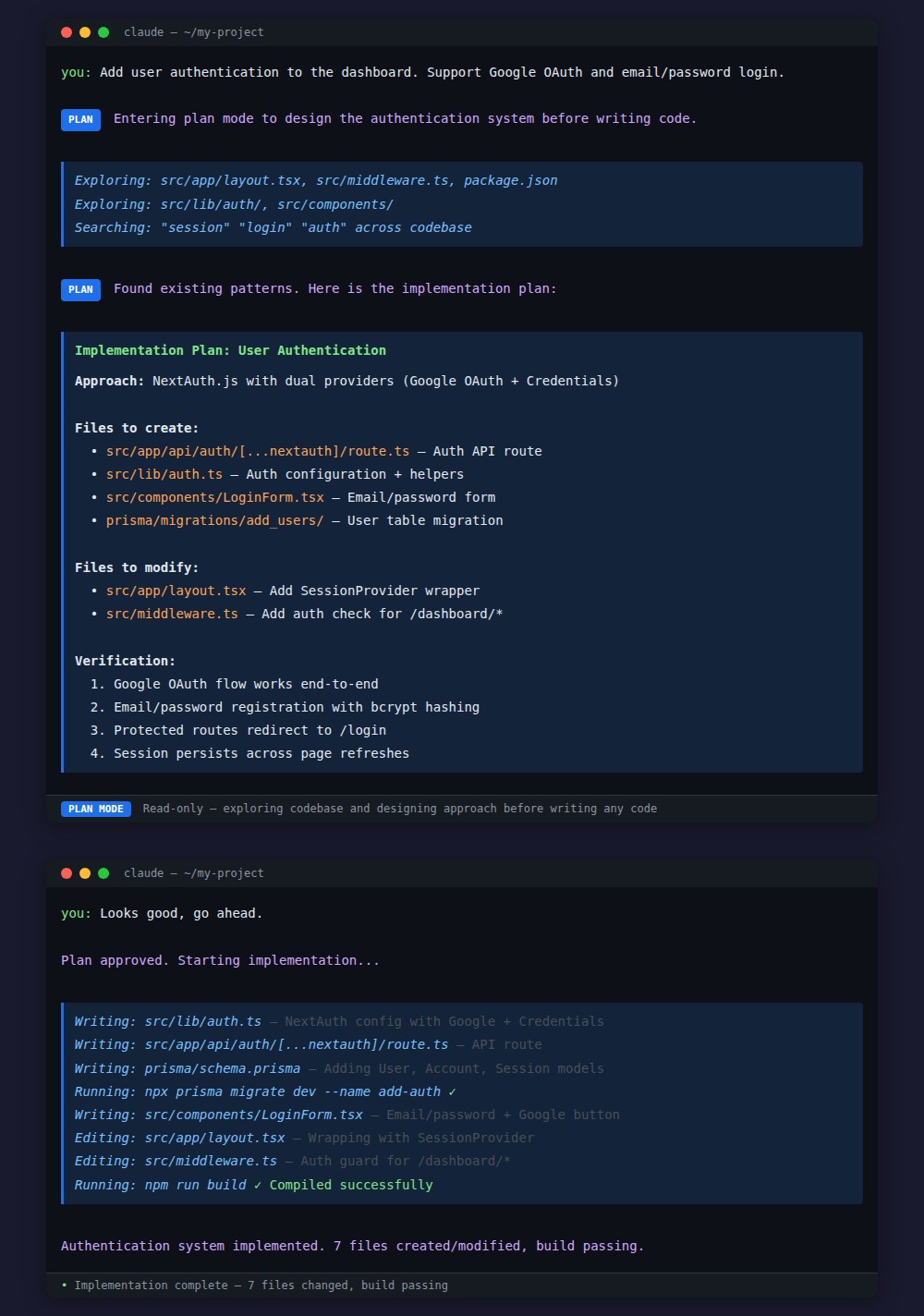
Plan Mode is the single most important workflow pattern I use when building software with AI. It forces alignment before code is written, preventing the most expensive mistake in AI-assisted development: building the wrong thing.
The problem it solves
When you ask an AI coding assistant to “add authentication” or “refactor the database layer,” it immediately starts writing code. Sometimes it’s exactly what you wanted. Often it isn’t.
The AI picks an approach based on its best guess: JWT when you wanted sessions, a new library when you already have one, a complete rewrite when you needed a targeted fix. By the time you see the output, it has written hundreds of lines of code in the wrong direction.
The cost isn’t just wasted tokens. It’s the time you spend reading, understanding, and then explaining why it needs to be different.
How Plan Mode works
Plan Mode separates thinking from doing. When activated, Claude enters a read-only exploration phase where it:
- Explores your codebase to understand existing patterns
- Identifies files that need to change and why
- Considers multiple approaches and trade-offs
- Writes a concrete implementation plan
- Waits for your approval before writing a single line of code
The key constraint: in plan mode, Claude cannot edit files. It can only read, search, and explore. This forces it to think before it acts.
My daily workflow
I use Plan Mode for every non-trivial task. The pattern is always the same:
Describe the goal, not the implementation. I say “separate Floship code into its own app” not “move these 7 files.” Claude figures out the specifics during exploration.
Review the plan, not the code. It’s much faster to review a bullet-point plan than 500 lines of code. I can spot wrong approaches in seconds.
Redirect early. If the plan is wrong, I say so before any code exists. “Don’t use a new library, we already have X” costs me 5 seconds. Finding the same mistake in code costs minutes.
Approve and let it run. Once the plan is right, implementation is usually flawless.
The economics
Without Plan Mode, the feedback loop is:
ask → wait for code → read code → find mistakes → explain corrections → wait againWith Plan Mode:
ask → review plan → approve → doneThe plan review takes seconds. The code review takes minutes. Over a day of development, this compounds into hours saved.
How to activate it
There are four ways to enter Plan Mode in Claude Code:
- Shift+Tab — toggle before sending your message
- /plan — slash command
- Natural language — just ask: “please enter plan mode and design the approach first”
- Automatic — Claude enters it proactively when the task warrants it
Claude Code is available at claude.ai/download. Plan Mode works on all plans, including the free tier.
When to use it
Use Plan Mode for anything that touches multiple files, has multiple valid approaches, or involves architectural decisions. Skip it for single-line fixes, typos, and tasks where you’ve already given very specific instructions.
I now routinely complete in an afternoon what used to take days — not because the AI writes code faster, but because we almost never build the wrong thing anymore.