Refactoring a Monolith: Extracting a 3PL Module Into Its Own App
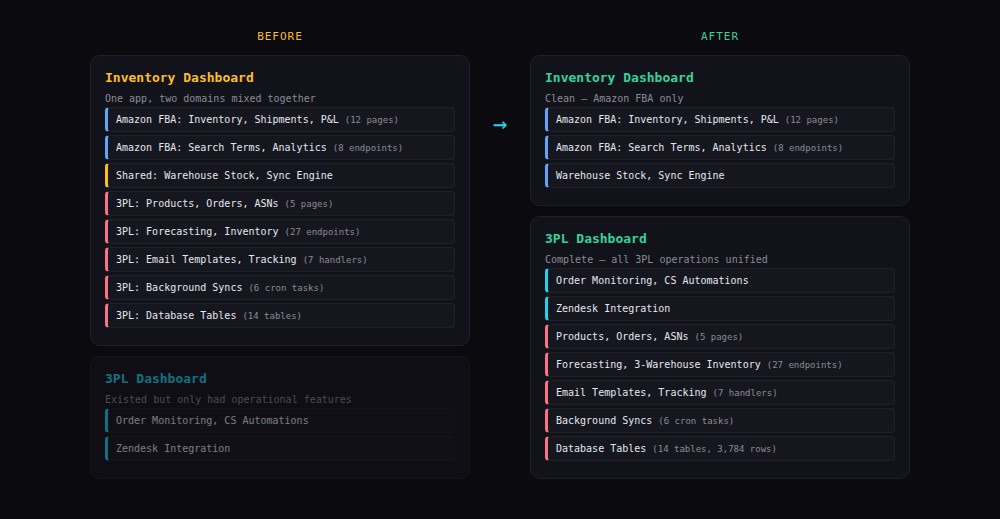
I build and maintain a suite of internal tools for my key client — an e-commerce supplements company. One of those tools is an inventory management dashboard that handles Amazon FBA operations: stock levels, shipments, P&L tracking, and search term analytics.
Over time, functionality for their Hong Kong-based 3PL provider got embedded into the same app — 5 HTML pages, 27 API endpoints, 14 database tables, 7 handler modules, and 6 background sync tasks. Two different business domains tangled in one monolith.
Today we separated them. Here’s how.
Why it mattered
The inventory dashboard should be about Amazon FBA. The 3PL dashboard should be about international fulfilment. When code for both lives in one app, every change risks breaking the other. The navigation had 15+ items mixing two unrelated domains.
Separation of concerns isn’t just architectural purity — it’s about reducing cognitive load for everyone who touches the code.
The approach
We used Plan Mode in Claude Code to design the migration before touching any code. The plan broke the work into 8 sprints, ordered by risk:
- Copy handler modules (low risk) — 7 Python files moved, import paths updated
- Migrate database tables (low risk) — 14 tables, 3,784 rows copied
- Move API routes (medium risk) — 27 endpoints wired into the new app
- Move HTML pages (medium risk) — 5 pages with navigation updates
- Move background syncs (medium risk) — 6 periodic tasks
- Reconcile overlaps (medium risk) — merge duplicate email/sync systems
- Remove from source (high risk) — gated behind 1 week soak
- Cleanup — docs, references, dead code
The key principle: additive changes first, destructive changes last. Sprints 1-6 only add code to the destination app. Sprint 7 (removing from the source) only happens after a week of verified dual-running.
What went smoothly
The handler modules copied without modification. They used relative path resolution for configuration — both apps have the same directory structure, so the paths resolved correctly.
The database migration was trivial — 3,784 rows across 14 tables, completed in seconds with INSERT OR REPLACE.
The API routes had one dependency to resolve: a function that fetched production schedule data from Google Sheets. Rather than duplicating the Google Sheets integration, we created a thin handler that reads the source app’s cached data file — a cross-app read that costs nothing and avoids credential duplication.
What was tricky
The destination app already had its own order sync system writing to a separate database file. The migrated code brought a second sync system writing to the main database. Both are needed during the transition — they serve different UI views. Merging them is a future task.
Email templates existed in two forms: database-stored (from the source app) and file-based (from the destination’s customer service automations). We kept both rather than forcing a premature merge.
The role of AI
Claude Code handled the mechanical work (see how I work with AI agents) (as described in how I work with AI agents) — copying files, updating imports, creating migration scripts, wiring routes. I handled the architectural decisions — which approach to take for overlapping features, how to handle dependencies, sprint ordering.
Plan Mode was essential. Without it, Claude Code would have started moving code immediately and likely hit the Google Sheets dependency 30 minutes in, requiring a rethink. With Plan Mode, we identified every dependency upfront and designed the approach before writing a line of code.
Results
Sprints 1-3 completed in under 2 hours. All 27 API endpoints verified returning correct data. The source app continues running unchanged. The destination app gained a full catalogue management capability alongside its existing operational features.
The remaining sprints are tracked in the project documentation with a different agent continuing the work — another benefit of explicit planning and documentation.