What It Actually Looks Like to Build Software with AI Agents
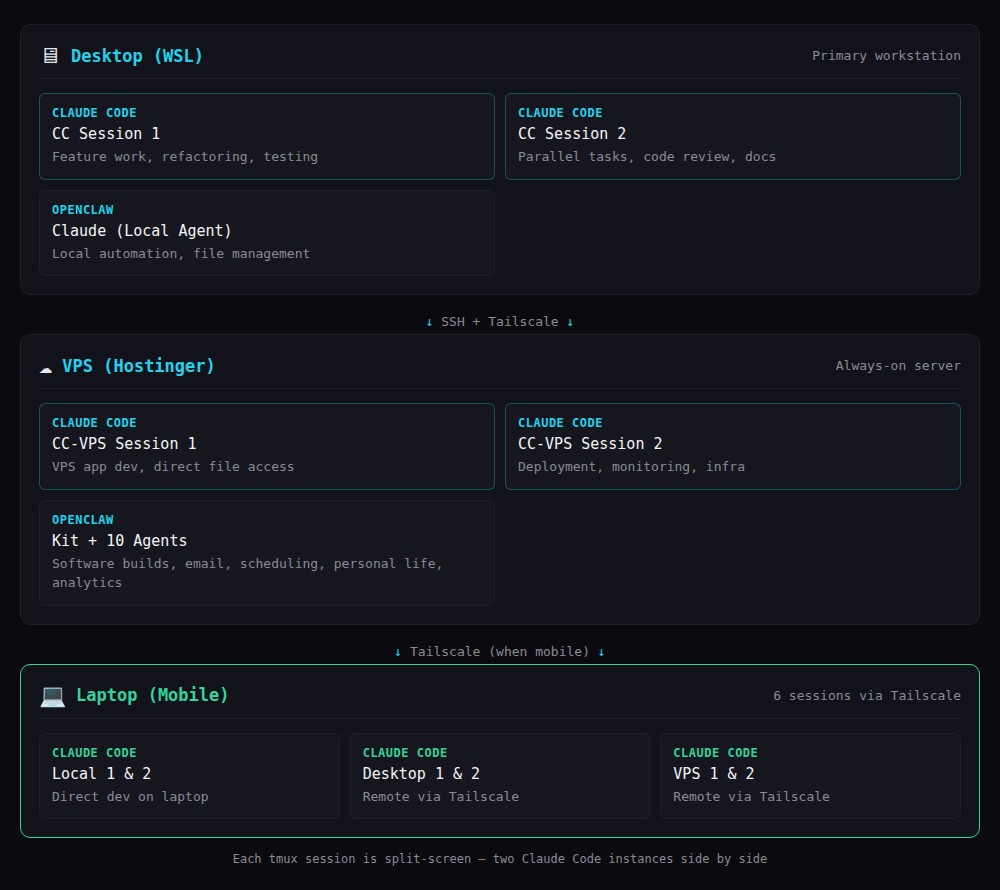
I ship a lot of software. People notice the output but don’t see the setup behind it. Here’s what it actually looks like — 4 Claude Code installations across 2 machines, an AI agent gateway running 11 agents, and a workflow that lets me run up to 6 development sessions simultaneously.
The setup
Desktop (WSL): Two Claude Code sessions in a tmux split — one for main feature work, one for parallel tasks. Plus a local OpenClaw agent.
VPS (Hostinger): Two more Claude Code sessions with direct file access to production apps. Plus Kit and 10 other OpenClaw agents handling operations, email, and analytics.
Laptop (when mobile): Six sessions total via Tailscale — two local plus remote access to all desktop and VPS sessions.
Each tmux screen is split down the middle. Two Claude Code instances side by side. All connected through a Tailscale mesh network.
What a typical day looks like
First thing: check Kit’s overnight messages. Kit runs scheduled tasks — email processing, database backups, health checks, monitoring. If anything needs attention, there’s a Telegram message waiting. I review Kit’s scheduled task summary to see what happened while I was asleep.
Then I look at the status of current projects. Where are we up to with the sprints? Some projects are still in the initial design stage. Others are mid-sprint. Others are in review.
During the design stage, I use Plan Mode. Claude Code explores the codebase, identifies dependencies, considers approaches, and presents a structured plan. I review the plan — not code — and redirect if the approach is wrong. This takes seconds.
During each major sprint, I also enter Plan Mode to plan out what’s left. The sprint plan becomes a living document that any agent can reference — if one agent hands off to another (desktop session to VPS session, or even a different agent entirely), the plan provides continuity.
Between sprints, I invoke the Principal Architect protocol for a systems review, then the Mentor protocol for a UX review. Both are documented methodologies that any agent can execute consistently.
What makes it produce quality code
The AI models matter enormously. Claude’s latest Opus 4.6 is genuinely capable of producing excellent, working code on the first attempt. That’s the foundation.
But what takes it from “great at generating words” to “producing production-quality code with very few bugs on initial build” is the same infrastructure that human engineering teams use:
- Git discipline — commit after every working change, clear messages, regular pushes
- Database playbooks — SQLite WAL mode, schema migration patterns, query optimisation guidelines
- Styling playbooks — documented design system with specific colour tokens, spacing, component patterns
- Performance playbooks — Core Web Vitals targets, lazy loading patterns, caching strategies
- Coding practices playbooks — verification pipeline, security checklist, error handling patterns
These aren’t AI-specific documents. They’re the same engineering standards any good team would maintain. The difference is that AI agents follow them consistently on every single task, consistently on every single task.
The tools that tie it together
Claw Recall indexes every conversation across all agents into a searchable database. When one agent needs context from another agent’s work, it searches memory instead of asking me to re-explain.
Shared tool documentation syncs daily to every agent. When I add a new CLI command, all 11 agents learn it within 24 hours.
Plan Mode prevents building the wrong thing. Reviewing a plan takes seconds. Reviewing wrong code takes minutes.
The economics
I routinely complete in an afternoon what used to take weeks before AI coding agents existed. Not because the AI writes code faster — though it does — but because the combination of explicit standards, plan-before-code workflow, and persistent memory means we almost never build the wrong thing, and the quality is right on the first attempt.
The real investment isn’t API tokens. It’s building reliable systems around the AI — the playbooks, the memory, the tool sync, the verification pipeline. That investment pays off every single day.